

#
Getting Started with Stackryze Domains
Warning
These docs are in Beta and actively updated daily. Please report if you find any issues.
This guide walks you through creating your account and registering your first subdomain on Stackryze Domains.
Note
Currently offering: indevs.in subdomains. More domains coming soon!
#
Step 1: Visit the Registration website
- Go to https://domain.stackryze.com/
- Click the "Get Started" button on the landing page
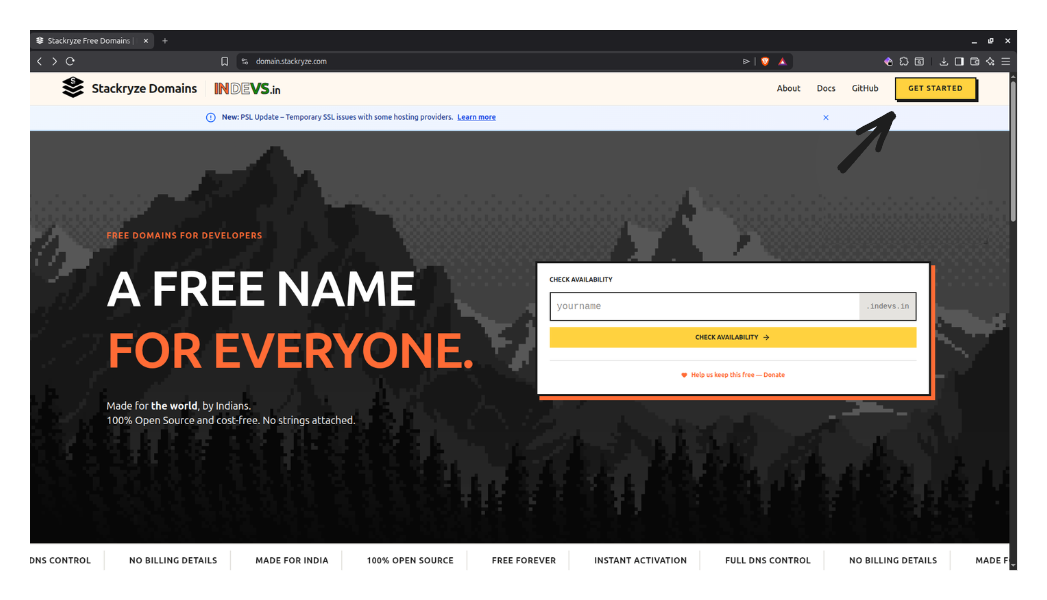
#
Step 2: Create an Account
#
Option A: Sign up with Email (Recommended)
- Click "Get Started" or "Register".
- Enter your Name, Email, and a secure Password.
- Complete the security check (Turnstile).
- Click "Create Account".
- You will see a verification screen. Check your email for a 6-digit code.
- Enter the code to verify your account.
Tip
Didn't receive the code? Click the "Resend" button on the verification page to get a new code.
#
Option B: Login with GitHub
Important
New GitHub registrations are currently paused. To use GitHub login, you must first create an account with Email/Password (using the same email address as your GitHub account). Once registered, you can link your GitHub account by logging in with it.
If you already have an account:
- Click "Login".
- Select the "GitHub" tab.
- Authenticate with GitHub.
#
Account Protection
To keep your account secure, we have implemented the following protections:
- Email Verification: Required for all new accounts.
- Account Lockout: After 5 failed login attempts, your account will be locked for 30 minutes. This prevents brute-force attacks.
Note on Passwords: If you set a password, ensure it is strong (min 8 characters).
#
Step 3: Navigate to Register Domain
After logging in, click "Register Domain" from the sidebar menu
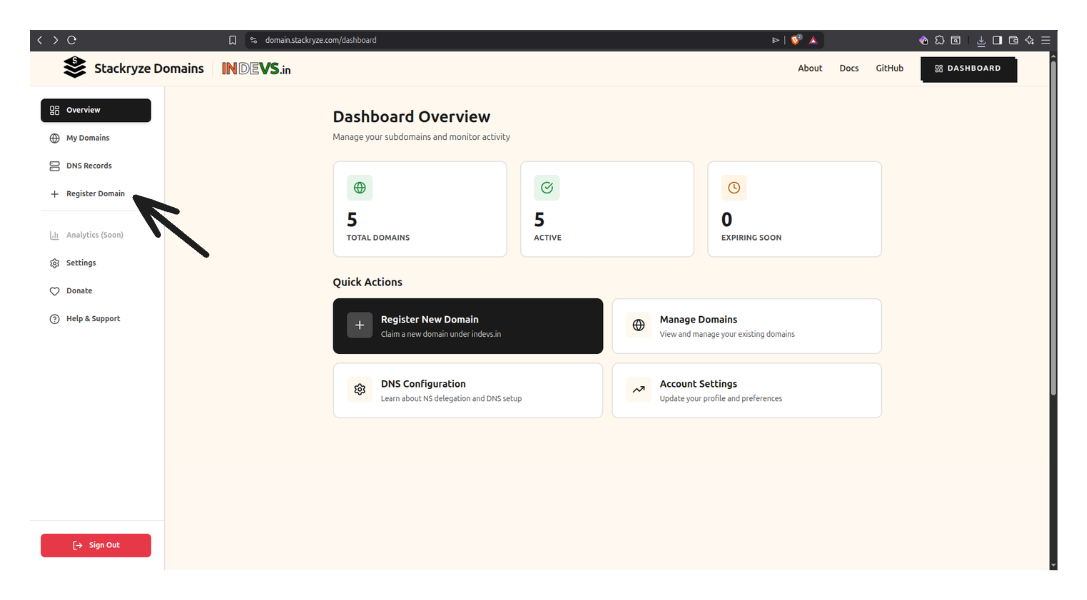
#
Step 4: Complete the Registration Form
Now fill out the registration form:

#
1. Enter Your Subdomain Name
Type your desired subdomain name in the input field.
Guidelines:
- Length: 3-63 characters
- Characters: Lowercase letters, numbers, and hyphens only
- Format: Cannot start or end with a hyphen
Examples:
- ✅
myproject→myproject.indevs.in - ✅
john-portfolio→john-portfolio.indevs.in - ❌
ab(too short) - ❌
-myproject(starts with hyphen)
#
2. Check Availability
The system automatically checks availability as you type:
- 🟢 Green checkmark - Domain is available!
- 🔴 Red X - Domain is taken or invalid
#
3. Accept Terms of Service
Check the box to accept the Terms of Service and Privacy Policy
#
4. Complete CAPTCHA
Complete the hCaptcha verification to prove you're human
#
5. Click "Register Domain"
Click the "Register Domain" button to complete registration
What Happens Next:
- ✅ Your domain is registered immediately
- ✅ DNS delegation is automatically configured
- ✅ Domain is valid for 1 year
- ✅ You'll see a success message
#
Step 5: Success!
Congratulations! Your domain is now registered and active.
What's next?
- View your domain in My Domains
- Set up DNS records with your DNS provider
- Learn how to manage your domain (renew, update nameservers, delete)
#
Domain Limits
You can register up to 5 domains by default. Domain names must be 3-63 characters long.
#
Having Issues?
If you encounter any problems during registration:
- 🔧 Troubleshooting Guide - Solutions for common login and registration errors
- 💬 Discord Community - Live help (Faster than email!)
- 📧 Email Support - Contact us for help
- 💬 Report a Bug - Technical issues
#
Next Steps
Now that you've registered your domain:
Set up DNS - Configure your DNS provider
- Cloudflare Setup - Recommended, free
- View all DNS providers
Manage your domain - Update nameservers, renew, or delete
Get help - Questions or issues?
- FAQ - Frequently asked questions
- Troubleshooting - Common issues
- Support - Contact us
Ready to get started? Visit domain.stackryze.com and register your first domain today!