

#
Managing Your Domains
Warning
These docs are in Beta and actively updated daily. Please report if you find any issues.
Learn how to manage your registered domains, update nameservers, renew, and delete domains.
#
Accessing Your Domains
- Sign in at domain.stackryze.com
- Click "My Domains" from the sidebar
You'll see all your registered domains with their current status, expiry date, and nameservers.
#
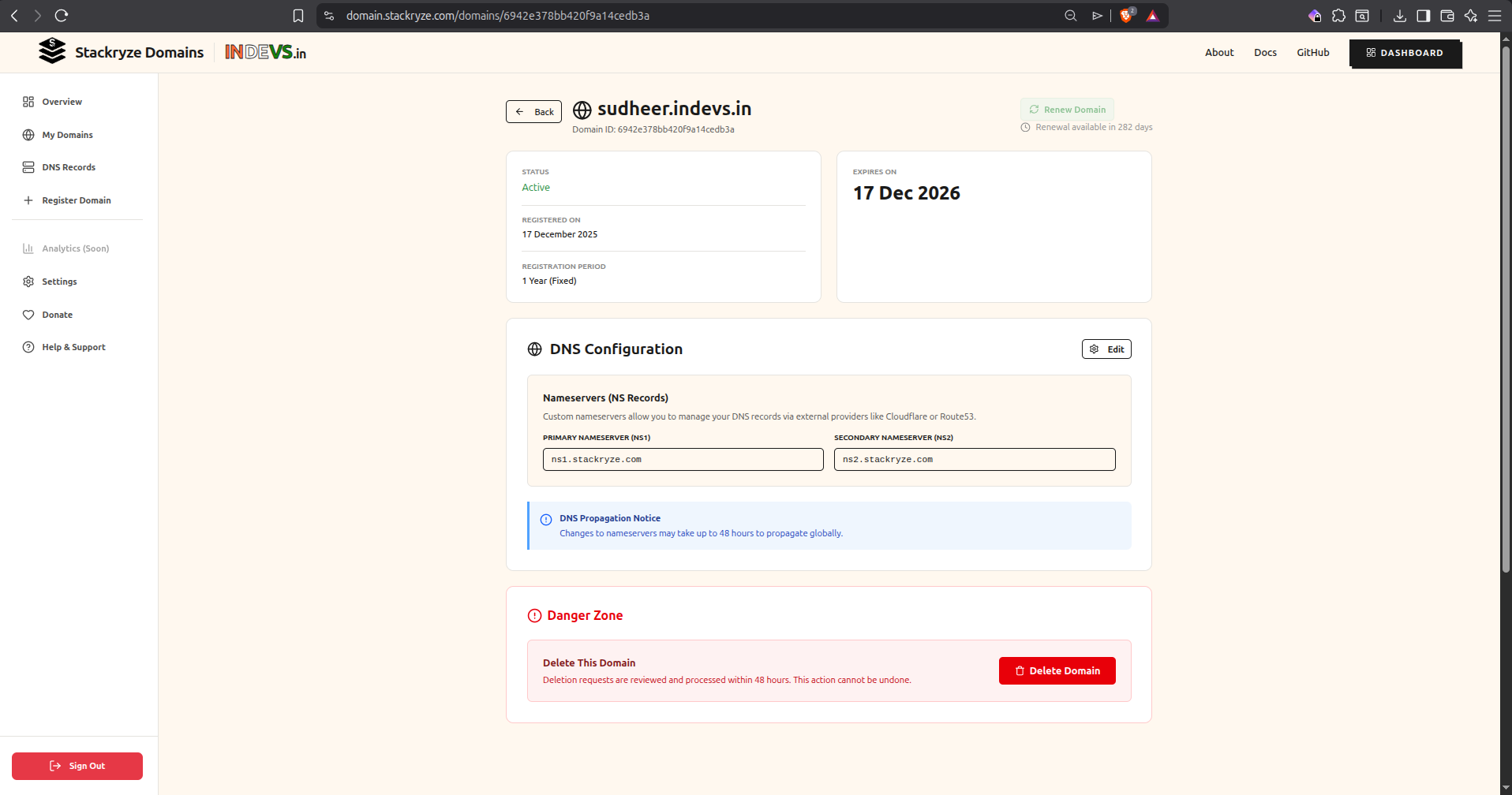
Domain Overview
Each domain shows:
- Domain Name - Your subdomain (e.g.,
yourname.indevs.in) - Status - Active, Expiring Soon, or Expired
- Registered On - When you registered the domain
- Expiry Date - When the domain expires
- Registration Period - Current validity period (1 Year Fixed)
- DNS Configuration - Current nameservers
#
Updating Nameservers
To change your DNS provider:
#
Step 1: Get Your New Nameservers
Set up your DNS provider first:
- Cloudflare - Recommended, free
- AWS Route 53
- Google Cloud DNS
- View all providers
#
Step 2: Update in Dashboard
- Go to My Domains
- Click the "Manage" button for your domain
- In the DNS Configuration section, click "Edit"
- Replace the default nameservers (
ns1.stackryze.com,ns2.stackryze.com) with your new ones:- Primary Nameserver:
ns1.example.com - Secondary Nameserver:
ns2.example.com
- Primary Nameserver:
- Click "Save"
Note
DNS changes propagate in 5-10 minutes but can take up to 48 hours globally.
#
Step 3: Verify DNS Propagation
Check if your nameservers updated:
dig NS yourname.indevs.inOr use online tools:
#
Renewing Domains
Domains are valid for 1 year from registration.
#
When Can I Renew?
- Renewal opens 60 days before expiry
- You'll receive email reminders at:
- 60 days before expiry
- 10 days before expiry
#
How to Renew
- Go to My Domains
- Find your domain in the list
- Click the "Renew" button (green button on the right)
- Confirm renewal
- Expiry date extends by 1 year

Tip
Renewal is 100% free! There's no cost to extend your domain.
Note
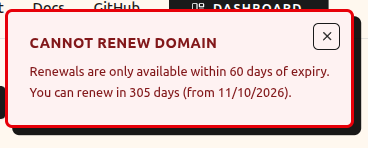
If you click "Renew" before the 60-day window, you'll see a message showing how many days until renewal is available.
#
What If I Don't Renew?
Important
- You can only renew the domain during the 15-day grace period.
- Once the grace period ends (Day 15), the domain is deleted and cannot be renewed.
#
Deleting Domains
If you no longer need a domain, you can delete it from the Danger Zone.
#
How to Delete
- Scroll to the "Danger Zone" section at the bottom
- Click "Delete Domain" button
- Confirm deletion
Caution
DNS records are removed immediately. Your domain will stop working right away.
#
Cooling-Off Period
After deletion:
- 7-day cooling-off period begins immediately
- Name cannot be registered by you or others during this time
- Deletion is permanent - domains cannot be restored once deleted
Warning
Once you delete a domain, it enters a 7-day cooling-off period. After 7 days, the name becomes available for anyone to register. Restoration is not possible.
#
Domain Status Types
#
Activity History
Track all changes to your domains:
- Click "History" from the sidebar
- View complete audit log of:
- Domain registrations
- Nameserver updates
- Renewals
- Deletions and restorations
- Login events
#
Domain Limits & Quotas
#
Default Limits
- Domains per account: 5
- Domain length: 3-63 characters
- Nameservers required: Minimum 2
- Renewal window: 60 days before expiry
- Grace period: 15 days after expiry
- Cooling-off period: 7 days after deletion
#
Need More Domains?
Email [email protected] with:
- Your GitHub username
- Reason for increase
- How many domains you need
We'll review and respond within 1-2 business days.
#
Common Issues
#
Nameservers Not Updating
Solution:
- Wait 5-10 minutes for propagation
- Clear DNS cache:
sudo systemd-resolve --flush-caches(Linux) - Verify nameservers are correct in dashboard
- Check with DNS Checker
#
Domain Not Resolving
Solution:
- Verify nameservers in dashboard
- Check DNS records in your DNS provider
- Ensure DNS zone is configured correctly
- Wait up to 48 hours for global propagation
#
Can't Renew Domain
Solution:
- You can only renew 60 days before expiry
- Check your domain's expiry date
- If expired, check if it's in the 15-day grace period
#
Accidentally Deleted Domain
Solution:
- Wait for the 7-day cooling-off period to complete
- Re-register the domain once it becomes available
- Note: Deletions are permanent and cannot be undone by support.
#
Best Practices
#
Regular Maintenance
- Check your domains monthly
- Set calendar reminders for renewal (60 days before expiry)
- Keep your email updated for notifications
- Monitor activity history for unauthorized changes
#
DNS Configuration
- Use a reliable DNS provider (Cloudflare recommended)
- Configure proper DNS records (A, CNAME, MX, TXT)
- Test your domain after any changes
- Keep nameservers backed up
#
Security
- Enable GitHub 2FA for account security
- Review activity history regularly
- Don't share account credentials
- Report suspicious activity to [email protected]
#
Need Help?
- Troubleshooting - Solutions for common issues
- Getting Started - Register your first domain
- DNS Providers - Setup guides for popular providers
- Discord Community - Live help
- Support - Contact us
- GitHub Issues - Report bugs